The Lab 7-1 DDoS That Never Happens
Intro
Practical Malware Analysis: The Hands-On Guide to Dissecting Malicious Software is a foundational text for learning how to analyse, debug and reverse engineer Windows malware. Published in 2012, it includes labs at the end of each chapter so you can practise the material covered. Chapter 7 deals with analysing malicious Windows programs, and its first lab (Lab 7-1) features a sample described as waiting until midnight on 1 January 2100 before flooding a website with requests.
Neither of these things happens. In this write-up we’ll explore why, and show what the sample actually does when it runs.
The book asks six questions about the sample. The last two are:
- What is the purpose of this program?
- When will this program finish executing?
And the book’s answers:
- This program waits until midnight on January 1, 2100, and then sends many requests to http://www.malwareanalysisbook.com/, presumably to conduct a distributed denial-of-service (DDoS) attack against the site.
- This program will never finish. It waits on a timer until the year 2100, and then creates 20 threads, each of which runs in an infinite loop.
These are the official answers, and they’re also the only answers I’ve found in other people’s write-ups of this lab. I’ve looked for anyone questioning them and come up empty. In fairness, the disassembly does look like it should behave this way, and it’s conceivable that some other system or configuration would produce that result. Having actually run it, I doubt it.
The timer never targets 2100
To build a timer that waits until 2100, the program constructs a SYSTEMTIME structure on the stack, zeroes it, and writes only the year field to the value 0x834, or 2100 in decimal. It then calls SystemTimeToFileTime to convert this into a FILETIME, which is passed to SetWaitableTimer as the due time.
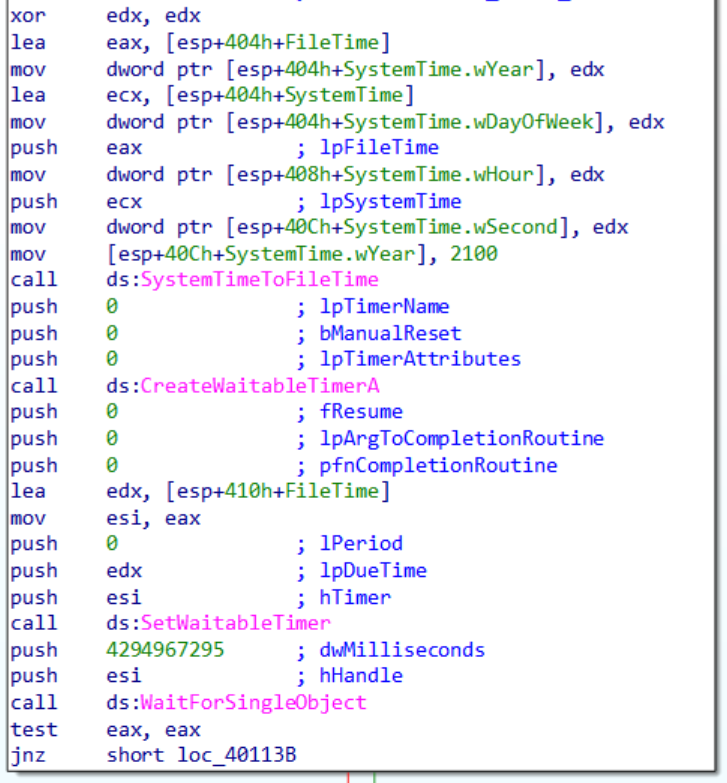
The problem is that the structure is invalid. Per the SYSTEMTIME documentation, wMonth must be between 1 and 12 and wDay between 1 and 31. Both are zero. SystemTimeToFileTime rejects the input, returns 0, and sets the last error to ERROR_INVALID_PARAMETER (87).
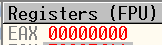

The program never checks that return value. It proceeds to SetWaitableTimer with whatever is in the FILETIME buffer.
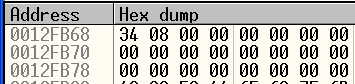
At 0x12FB68 you can see the SYSTEMTIME, with 0x834 in the year field (2100 in decimal). At 0x12FB78 is the FILETIME, which after the failed call contains sixteen zeros. A FILETIME counts 100-nanosecond intervals since 1601-01-01 UTC, so all zeros is that date.
SetWaitableTimer treats a positive due time as an absolute UTC time and a negative one as a relative offset. Zero is not negative, so it is read as absolute 1601-01-01, over four centuries in the past. This causes the timer to be signalled immediately, WaitForSingleObject returns instantly, and everything that’s meant to happen in the year 2100 happens the instant you run the sample.
My understanding is that the zeroed FILETIME buffer isn’t guaranteed. When SystemTimeToFileTime fails, the contents of the output buffer are technically undefined and it is zero here because that region of stack happened to be zero.
The DDoS sends two/four requests and stops
Once the wait returns, the program creates 20 threads, each with its entry point set to the following function:
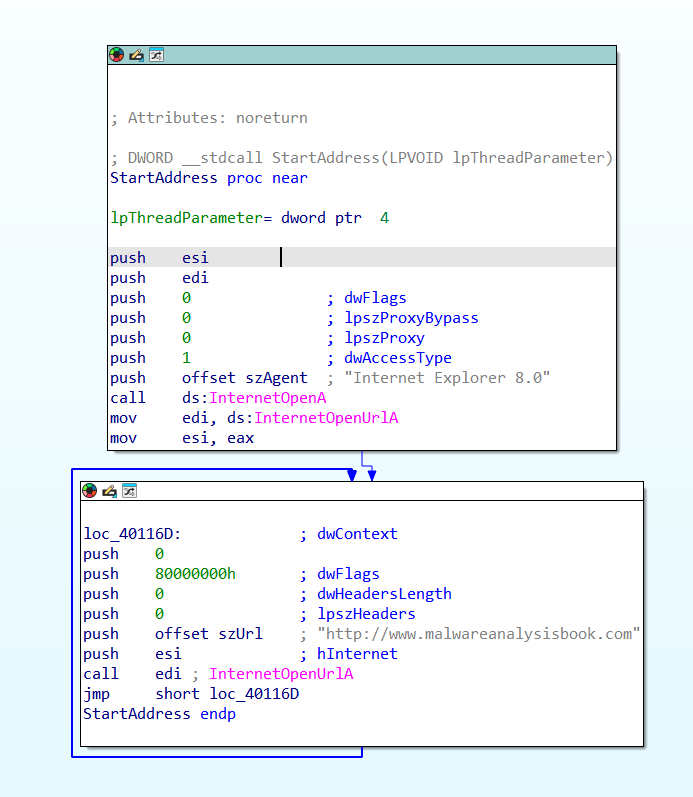
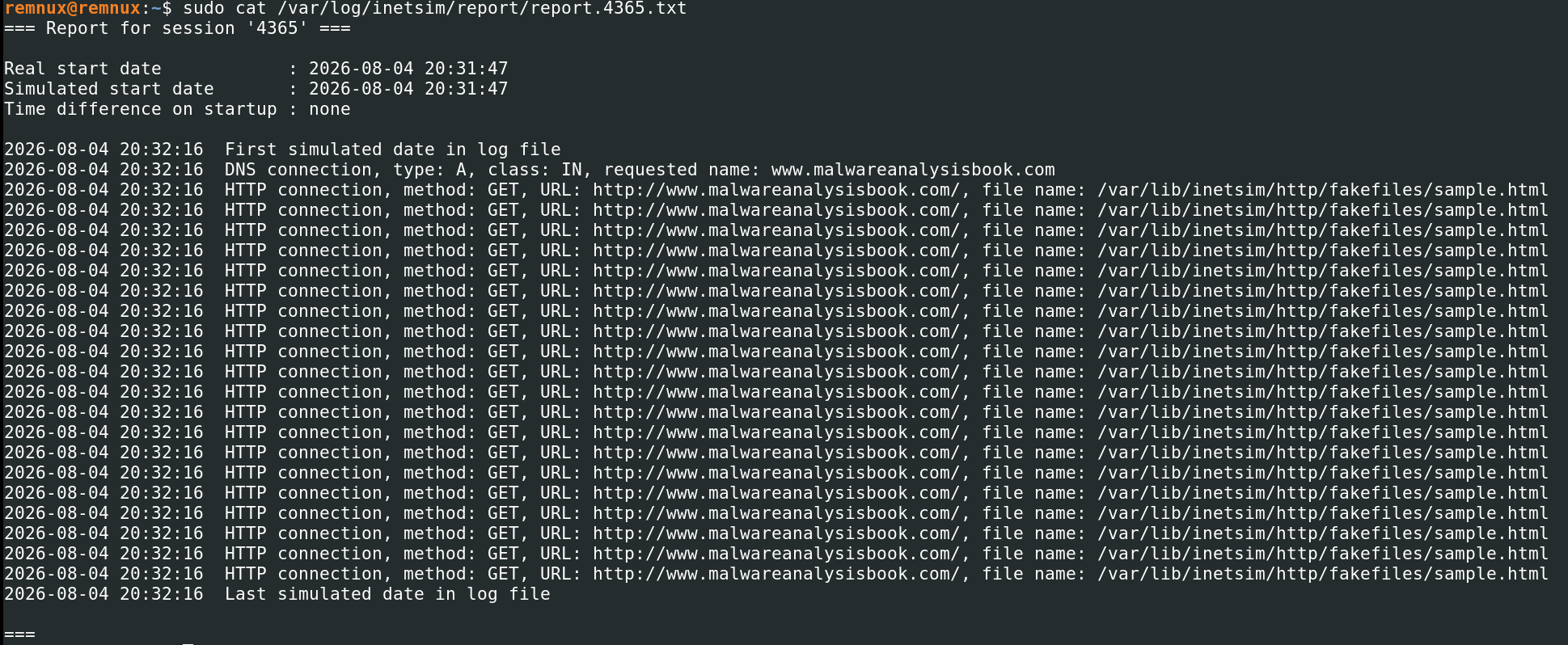
The observed behaviour against INetSim is two GET requests, not a flood.

My first thought was caching, since both requests are sent before the reply arrives and nothing follows it. That turned out to be wrong: the call to InternetOpenUrlA passes 0x80000000 in dwFlags, which is INTERNET_FLAG_RELOAD, and that disables caching. My next thought was an INetSim quirk, so I tried a Python HTTP server instead.

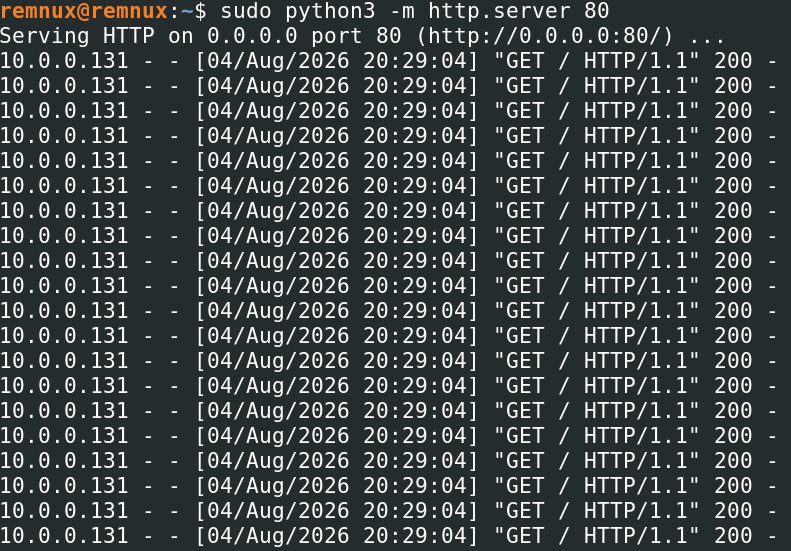
That gave four connections rather than two, but still not a flood. After some research the cause is that InternetOpenUrlA returns an HINTERNET handle which the program never passes to InternetCloseHandle. Every request leaks its connection, so the process runs into WinInet’s per-server connection limit and stays there. That limit comes from the MaxConnectionsPerServer and MaxConnectionsPer1_0Server values under HKCU\Software\Microsoft\Windows\CurrentVersion\Internet Settings, which govern HTTP/1.1 and HTTP/1.0 respectively and default to 2 and 4. INetSim serves HTTP/1.1 and the Python server serves HTTP/1.0, which is the two numbers observed.
To test this, I set both values to 20 and ran the sample against each server again.
| Server | HTTP version | MaxConnectionsPerServer | GETs observed |
|---|---|---|---|
| INetSim | 1.1 | 2 (default) | 2 |
| Python Server | 1.0 | 4 (default) | 4 |
| INetSim | 1.1 | 20 | 20 |
| Python Server | 1.0 | 20 | 20 |
The request count tracks the configured limit. Once the limit of handles is reached the next call blocks waiting for one to free up. This also means the program doesn’t stop so much as seize. The threads are still alive, but permanently blocked inside InternetOpenUrlA waiting on a connection that does not get released.
Conclusions
Both problems are caused by a return value that is not checked. SystemTimeToFileTime fails on an invalid SYSTEMTIME and the program carries on with a due time of 1601, so the timer fires immediately. InternetOpenUrlA hands back a handle that is not closed, so the threads exhaust WinInet’s connection pool after two/four requests and is blocked there for good.
So the answers I would give to the book’s last two questions:
What is the purpose of this program? It is intended to flood http://www.malwareanalysisbook.com/ with requests starting at midnight on 1 January 2100. As written it cannot do either half of that. It starts the moment it is run, and it manages two/four requests before deadlocking on its own leaked handles.
When will this program finish executing? It won’t, but not because it is waiting for the next century. Its threads block permanently inside InternetOpenUrlA.
None of this really makes the book wrong. The disassembly does say 2100, and the thread function is written as an unbounded flood. The book itself makes the point that malware is often badly written and that the labs are there to imitate that, so this may simply be an example of it. What I found interesting is that I couldn’t find anyone discussing it; instead I found post after post arriving at the same conclusions as the book.
Enjoy Reading This Article?
Here are some more articles you might like to read next: